
Why Tailscale on a VPS
herald-setup prefers Tailscale whenever it is running. Without it, a VPS has no address your phone can use: Herald refuses plain HTTP to public addresses, and herald-setup may pick a private cloud address, such as 10.x.x.x, that your phone can’t reach.
With Tailscale, the server gets an HTTPS name on your tailnet that is served only to your own devices. Hermes stays on 127.0.0.1, nothing new listens on the public interface, and you don’t touch the provider’s firewall.
Requirements
- Server
- Linux on x86_64 or aarch64; Hermes tests on the latest Ubuntu
- Access
- SSH from your computer
- Tailscale
- On the server and on your phone, with the same account
- Node.js
- 20 or newer, for
npx herald-setup - Cost
- Tailscale’s Personal plan is free for non-commercial use
Set it up
- Connect over SSH
Use SSH rather than your provider’s browser console. Hermes’ Docker guide warns that some browser consoles change pasted characters such as
:and@. - Install Hermes Agent
Run the installer as the user that will run Hermes. The installation guide covers service users without sudo.
curl -fsSL https://hermes-agent.nousresearch.com/install.sh | bash source ~/.bashrc hermes setup - Install Tailscale and sign in
Open the sign-in link it prints on your laptop or phone, using the same account as your phone.
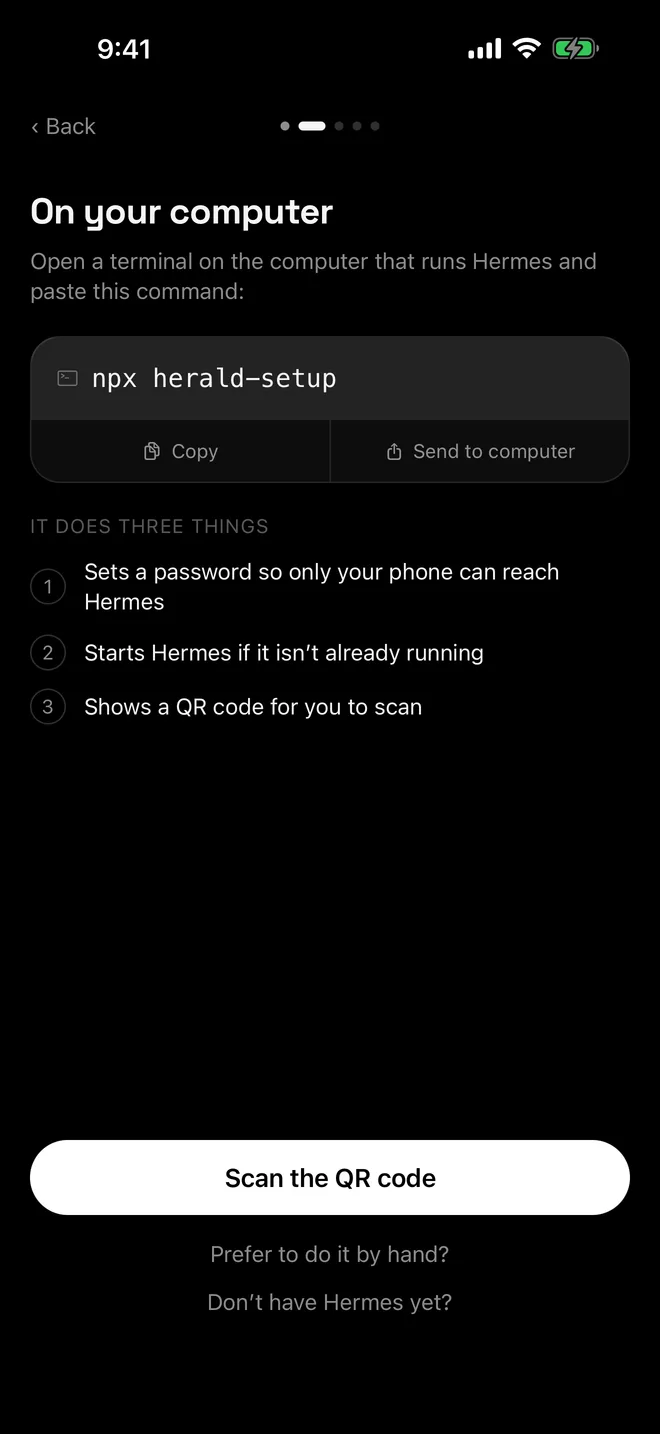
curl -fsSL https://tailscale.com/install.sh | sh sudo tailscale up - Run herald-setup
It picks the server’s tailnet name, sets the dashboard password, runs
tailscale serve --bg 9119and draws the QR code in your SSH session. If Linux refuses the Serve change for your user, runsudo tailscale set --operator=$USERand try again.npx herald-setup - Scan the QR code from your screen
Tap Scan the QR code in Herald and point the camera at your terminal. If the code doesn’t draw, type the printed address, username and password into Enter an address manually.
Keep Hermes running
A Hermes started by herald-setup stops when your SSH session ends. Run it as a systemd user service with lingering turned on, as shown in the Linux guide. Tailscale keeps the Serve mapping across reboots, and the password stays in ~/.hermes/config.yaml.
To pair again later, run npx herald-setup --no-serve so the helper doesn’t compete with the service, then restart the service if it asks.
Check that nothing is exposed
- Hermes listens only on
127.0.0.1:9119. Check withss -ltn | grep 9119. - Port 9119 stays closed in your provider’s firewall. Hermes’ docs call any open port on an internet-facing machine a security risk.
- Tailscale Funnel is off for the server’s name. herald-setup won’t publish through Funnel without an explicit yes, and
tailscale funnel --https=443 offturns it off. - Hermes’ OpenAI-compatible API server (port 8642) stays off unless another tool needs it, and then only with an API key.
What about a public HTTPS address?
The alternative to Tailscale is a public HTTPS name through a reverse proxy or Cloudflare Tunnel. Herald can use either, but both put Hermes’ password sign-in on the internet, which Hermes’ own docs advise against. Hermes recommends OAuth sign-in for internet-facing dashboards, and Herald signs in with a username and password only.
Troubleshooting
- No Tailscale or Wi-Fi address found. Tailscale isn’t running. Run
sudo tailscale up, then run herald-setup again. - Tailscale refused the change for this user. Run
sudo tailscale set --operator=$USER. - HTTPS certificates are not enabled. See Tailscale HTTPS certificates.
- Herald keeps signing out. See signed out with a 401.
Questions
Can I use the VPS’s public IP with http://?
No. Herald and herald-setup refuse plain HTTP to public addresses, so your password never crosses the internet unencrypted. Use Tailscale, or an HTTPS address.
Can Herald sign in with Nous Portal OAuth?
No. Herald signs in with the dashboard username and password. Hermes recommends OAuth for dashboards on the public internet, which is one more reason to keep a VPS behind Tailscale.
How powerful does the VPS need to be?
The Hermes docs describe running it on a $5 VPS. The language model runs at your provider, unless you choose to host one on the server yourself.
Should the VPS be my primary connection?
It can be. The primary connection hosts kanban, mail and push in Herald, so an always-on server suits it. You can change the primary in Settings at any time.

