
Who this guide is for
This guide is for a Mac you also use every day, such as a MacBook or an iMac. If the Mac will sit on a shelf and run all the time, read the Mac mini guide instead: pairing works the same way, but sleep and restarts need more care.
Herald is an independent app for iPhone, iPad, Apple Watch, CarPlay and Android. It connects straight to the Hermes Agent on your Mac, with no Herald server and no account, so your phone has to be able to reach the Mac. That works on the same Wi-Fi, or from anywhere with Tailscale.
What you need
- Mac
- Apple silicon. Hermes’ installation guide says Intel Macs are not a supported platform.
- Hermes Agent
- Installed, with the
hermescommand working in Terminal - Node.js
- 20 or newer, to run
npx herald-setup - Network
- The same Wi-Fi as your phone, or Tailscale on both to connect from anywhere
- Herald
- On iPhone, iPad or Android, $12.99 once
Install Hermes Agent
Follow the official installation guide. On a Mac you can download the Hermes Desktop app, or install the command-line version with the one-line installer below. herald-setup needs the hermes command in Terminal; if it can’t find it, it stops and prints the same install command.
After installing, reload your shell with source ~/.zshrc and run hermes setup to choose a model provider and tools.
curl -fsSL https://hermes-agent.nousresearch.com/install.sh | bashPair Herald with your Mac
- Install Tailscale on the Mac and your phone (optional)
With Tailscale signed in on both, herald-setup gives your phone an HTTPS address that works away from home. Without it, pairing uses your Wi-Fi address, which only works on the same network. See Tailscale for Hermes Agent.
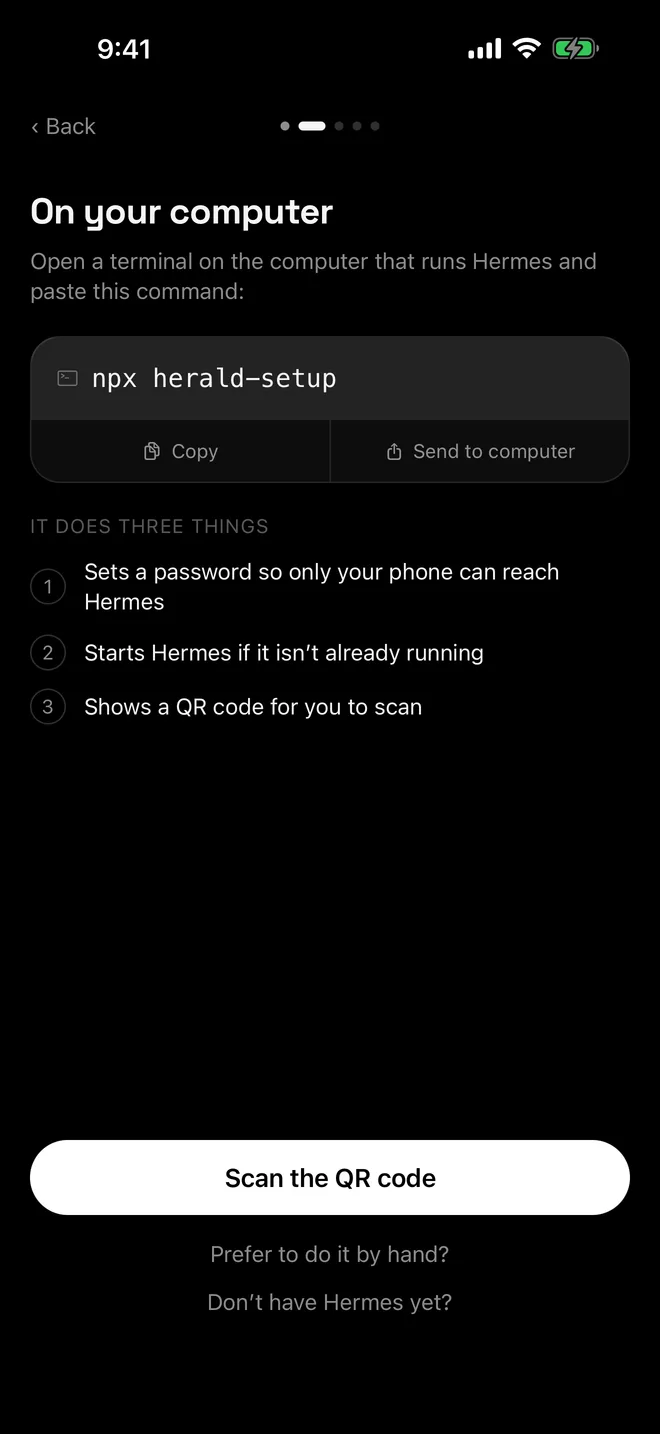
- Run herald-setup in Terminal
Run it on the Mac that has Hermes. It asks for a dashboard username (press Return to accept
herald) and, if a password already exists, whether to keep it.npx herald-setup - Let it finish
It saves the username and a hashed password in
~/.hermes/config.yaml, publishes Hermes with Tailscale Serve when Tailscale is running, startshermes serveif nothing answers and draws a QR code. - Scan the QR code in Herald
Open Herald, tap Scan the QR code and point the camera at Terminal. A new password travels inside the code, so there is nothing to type. If you kept an old password, Herald asks you for it.
- Keep the window open
If herald-setup started Hermes, Hermes runs until you close the window or press Ctrl-C. On Wi-Fi, the same window also carries your phone’s connection.
Keep your Mac awake
Herald can only reach Hermes while the Mac is awake. macOS includes caffeinate, which the Hermes docs suggest for keeping the host awake. It works only while it runs, and it can’t stop a MacBook sleeping when you close the lid; for lid-closed use, the Hermes docs point you to your Energy or Battery settings.
caffeinate -dis              # Keep the display and system awake.
caffeinate -dis -t 28800     # The same, for eight hours.
pkill caffeinate # Stop it.-s part only applies while the Mac is on mains power.Notes for Macs
- herald-setup looks for Tailscale’s command-line tool on your PATH and inside
/Applications/Tailscale.app, so the Tailscale Mac app is enough. - If you also use the Hermes desktop app, update Hermes before pairing:
hermes updatefor a command-line install, or the app’s Update control for the desktop bundle. On older versions, thedashboard.public_urlsetting that herald-setup writes also locked the desktop app out of its own backends. - To start Hermes later without the helper, run
hermes serve --port 9119. The password and the Tailscale Serve mapping stay in place, so Herald reconnects. On Wi-Fi you still need herald-setup running, because it carries the connection. - After
hermes update, restart anyhermes serveyou started yourself. The Hermes update guide notes that backends you launch by hand keep running the old code.
If something goes wrong
- Couldn’t reach the address. On the Mac, check that
curl http://127.0.0.1:9119/api/healthanswers, and that both devices are on the same Wi-Fi or tailnet. See Herald can’t connect. - Signed out, or HTTP 401. Herald signs in again by itself when it has the password saved. If it doesn’t, see signed out with a 401.
- Tailscale HTTPS errors. See Tailscale HTTPS certificates.
- No bots in the list. See an empty bot list.
Questions
Does Herald work with Hermes on an Intel Mac?
Hermes Agent supports macOS on Apple silicon. Its installation guide says Intel Macs are not a supported platform, although its platform page notes that the command-line install can still run there. Check the Hermes docs for your Mac first. Herald itself only needs a working Hermes and npx herald-setup.
Why does herald-setup say it is using 127.0.0.1?
It found neither Tailscale nor a Wi-Fi address. That address only reaches the iOS Simulator on the same Mac. Join your Wi-Fi network or start Tailscale, then run npx herald-setup again.
Do I need Tailscale?
Not at home. On the same Wi-Fi, herald-setup uses your Mac’s Wi-Fi address over plain HTTP. To reach the Mac from anywhere, or to encrypt the connection, install Tailscale on the Mac and the phone and run the helper again.
Can I use Herald and the Hermes desktop app together?
Yes. Both use the same Hermes data, so sessions and group rooms show up in both. Update Hermes before you pair, because older versions let the dashboard address setting lock the desktop app out of its own backends.
What does herald-setup change on my Mac?
It writes dashboard.basic_auth (a username, a scrypt hash of the password and a signing secret) to ~/.hermes/config.yaml, keeping your comments, and sets dashboard.public_url for Tailscale and Wi-Fi addresses. With Tailscale it adds a Serve mapping for port 9119. Hermes itself stays on 127.0.0.1, and when the helper starts Hermes, Hermes’ output goes to ~/.hermes/logs/herald-setup.log.

