
Why use a Mac mini
A desktop Mac can stay awake with its display off, which makes a Mac mini a natural always-on host for Hermes. Your bots keep running while your laptop sleeps, and Herald reaches them from anywhere through Tailscale.
Pairing works exactly as on any other Mac. This guide covers what changes when nobody sits at the machine: sleep, power cuts, logging in after a restart and keeping hermes serve alive.
What you need
- Mac
- A Mac mini with Apple silicon
- Hermes Agent
- The command-line install, so
hermesworks in Terminal - Tailscale
- The Standalone Mac app, which Tailscale recommends; it needs macOS 12 or later
- Node.js
- 20 or newer, for
npx herald-setup - Remote access
- Optional: SSH from your laptop, so you can run commands without a screen
Set up the Mac mini
- Stop it sleeping
In System Settings › Energy, turn on Prevent automatic sleeping when the display is off. Also turn on Start up automatically after a power failure; some Macs show Start up when power is connected instead, where you choose After power failure.
- Install Hermes Agent
Use the command-line installer from the Hermes docs, reload your shell, then run
hermes setup.curl -fsSL https://hermes-agent.nousresearch.com/install.sh | bash - Install Tailscale and turn on HTTPS
Install Tailscale’s Standalone app and sign in with the same account as your phone. In the Tailscale admin console, open the DNS page, check that MagicDNS is on and select Enable HTTPS under HTTPS Certificates.
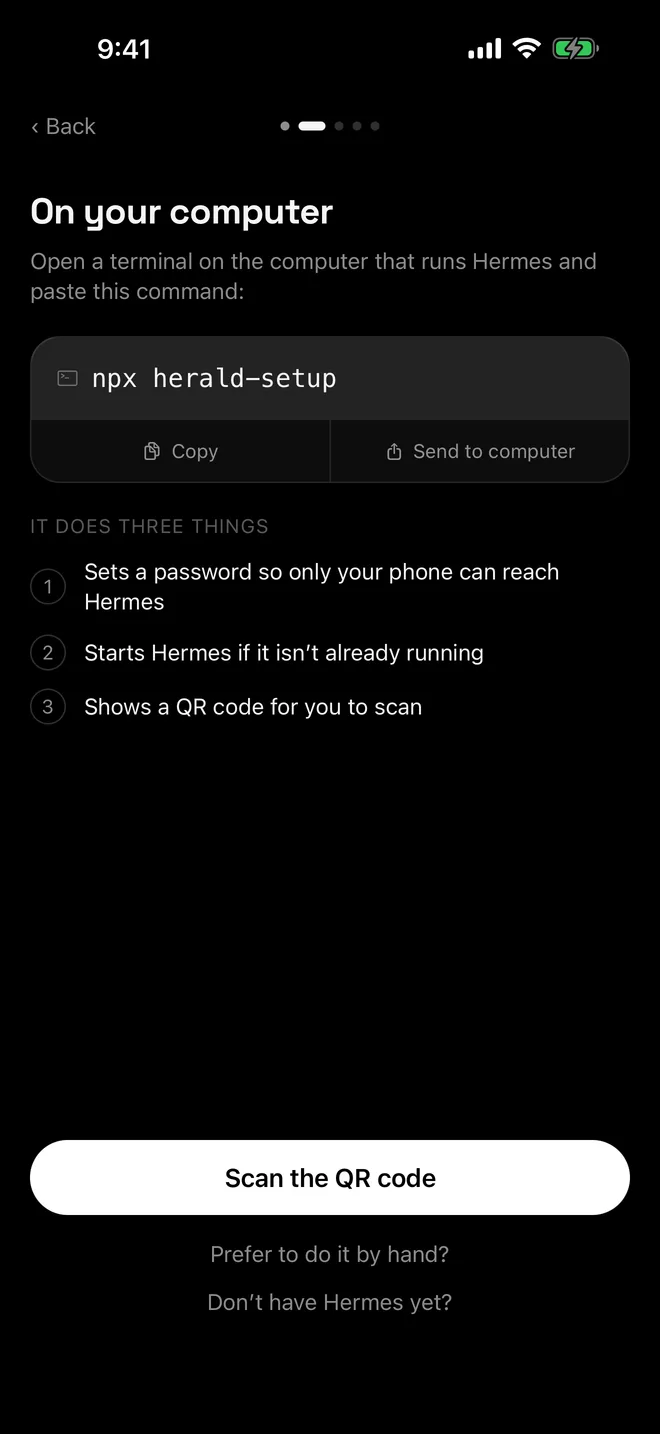
- Run herald-setup
You can run it over SSH. Its questions work in any interactive session and the QR code prints in your terminal, so you can scan it from your laptop’s screen.
npx herald-setup - Scan the QR code in Herald
In Herald, tap Scan the QR code. Keep Tailscale switched on in your phone whenever you use Herald.
Keep Hermes running
If herald-setup started Hermes, Hermes stops when you close its window or press Ctrl-C. On an always-on Mac, start Hermes yourself in a session you leave open, such as a Terminal window or tmux, with hermes serve --port 9119.
The Hermes docs say to keep hermes serve under a process manager so it survives logout and reboots, but they don’t ship a ready-made macOS service for it. hermes gateway install creates a launchd service for the messaging gateway, which is a separate process from the backend Herald talks to.
When something else already keeps Hermes running and you pair again, add --no-serve. herald-setup then configures Hermes and prints the QR code without starting or stopping it, and tells you when Hermes needs a restart to pick up a new password.
Make it the hub of your roster
- Make the Mac mini your primary connection in Herald’s Settings. The primary connection hosts kanban, mail and push notifications.
- Add push notifications with the hermes-bot-push plugin. See push notifications.
- Pair a laptop or a VPS as well. Every computer’s bots join one roster; see several computers in one roster.
- Let the display sleep. Only the system has to stay awake.
Troubleshooting
- Unreachable after a power cut. Log in on the Mac so Tailscale reconnects, then start Hermes. See Herald can’t connect.
- Tailscale says HTTPS certificates are off. See Tailscale HTTPS certificates.
- Bots are missing. See gateway not running and an empty bot list.
- herald-setup says Hermes is running with the old settings. Restart Hermes with
hermes serve --stop, thenhermes serve --port 9119, so it loads the new password.
Questions
Will Herald reconnect after the Mac mini restarts?
Yes, once Tailscale is connected and Hermes is running again. Herald keeps retrying, and after repeated failures it also tries the saved address in its other forms. Bringing the app back to the foreground retries straight away.
Can I use caffeinate instead of the Energy settings?
Yes. The Hermes docs show caffeinate -dis for keeping a Mac awake. It only works while it runs, so the Energy settings are simpler for a Mac that should never sleep.
Should I use the open-source tailscaled on a headless Mac?
It is the only Mac variant that runs before login, but Tailscale recommends it only for unattended installs managed by experienced macOS administrators. herald-setup works with it as long as the tailscale command is on your PATH.
Is it safe to leave Hermes running all the time?
herald-setup keeps Hermes on 127.0.0.1 and publishes it only to your tailnet with Tailscale Serve, behind the dashboard password. Don’t turn on Tailscale Funnel for the Mac’s name: that would put the sign-in page on the public internet.

